

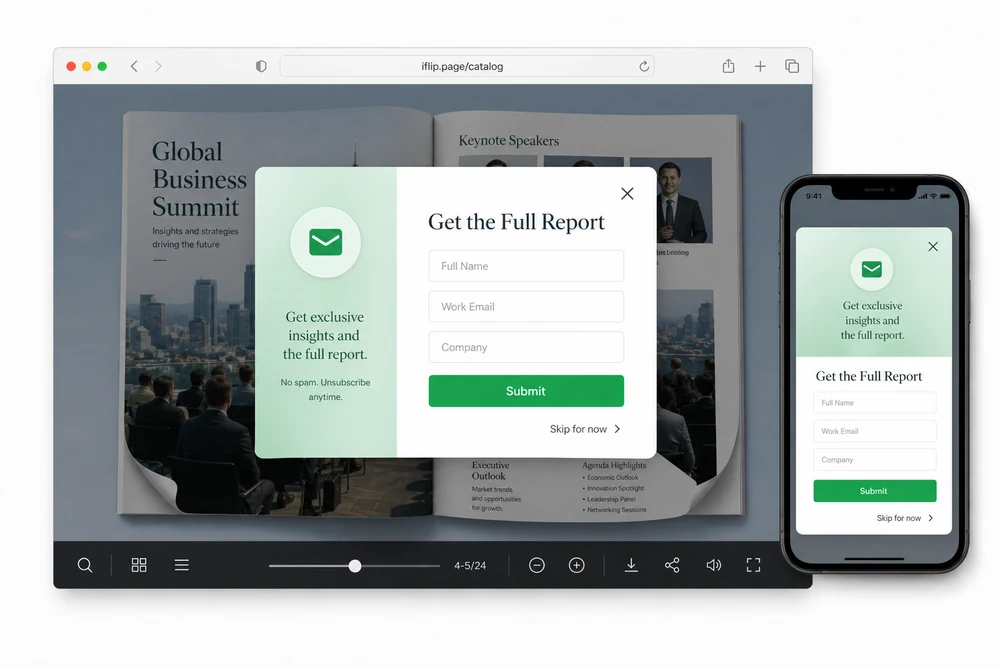
Why capture leads inside the flipbook
Traffic to a catalog means little if contacts land somewhere else. A lead form on the page captures interest while the reader is still engaged.
Use it for gated catalogs, event books, price lists, and campaign microsites where you want emails and names without a separate landing page.
What you can collect
- Name, email, and phone
- Up to five custom fields for campaign-specific questions
- Optional skip so readers can continue without submitting
Forms are branded to match the flipbook. Leads land in your dashboard for review and CSV export.
How you set one up
- Open the flipbook settings for lead forms.
- Choose fields and whether skip is allowed.
- Place the form on the cover or another page.
- Publish and share the flipbook link or embed.
- Review leads and export CSV when you follow up.
Common setups
Cover gate
Ask for email before the full book opens.
Mid-catalog ask
Let readers browse first, then capture interest on a pricing or offer spread.
High-intent page
Put the form next to a quote request or download moment.
Details that matter in practice
- Custom fields keep campaign data clean.
- CSV export fits CRM and email tools.
- Pair with Statistics to see views and leads together.
- Available on plans that include lead capture. See Pricing.
FAQ
Where can the form appear?
On any page: cover, mid-spread, or a high-intent moment.
What fields can I collect?
Name, email, phone, plus up to five custom fields.
Can readers skip the form?
Yes. You can allow skip when you want a softer gate.
How do I export leads?
Review submissions in the dashboard and download CSV.


