

Why add video to a PDF flipbook
A plain PDF link that dumps people on YouTube is easy to ignore. An interactive PDF flipbook with video on the page, next to the product, the step, or the story, keeps attention where you want it.
Use it for catalogs, magazines, brochures, and training books when a still image is not enough: a product demo, a walkthrough, a brand film, a case study. The flipbook stays the container. The video is another block on the page.
Two ways to place a video
Play Icon
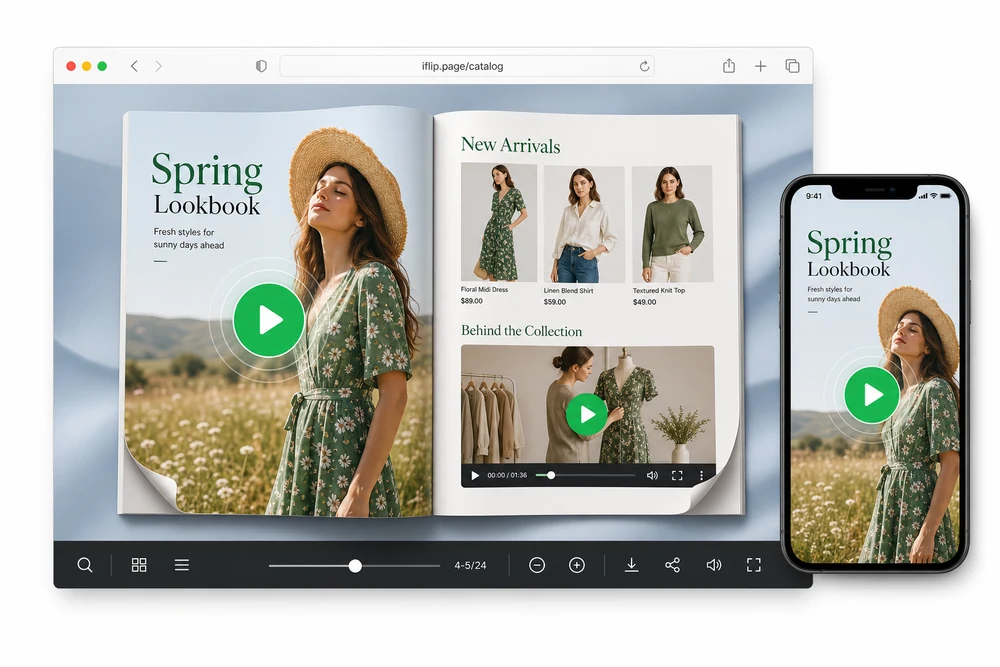
Drop a play button on the page. Readers tap it and the video opens in the enlarge player. Good when you want a clean page and a clear “watch this” marker, without a big video box sitting on the design.
Video Embed on Page
Draw a rectangle on the page and the video plays in that box. Good when the clip is part of the layout, like a product demo next to a photo.
Same sources for both: YouTube, Vimeo, or MP4. You choose the placement style when you add the video.
How you add one
- Open the flipbook and go to page media.
- Choose Play Icon or Video Embed on Page.
- Click or draw on the page to place it.
- Paste a YouTube or Vimeo URL, or use an MP4.
- Adjust color, pulse, autoplay, mute, or controls as needed.
- Publish. Readers play it inside the flipbook.
If someone flips away, playback pauses. On phones, the player opens at a usable size.
What you can use
- YouTube: public watch or share links.
- Vimeo: when your videos already live there.
- MP4: when you want a hosted file instead of a streaming site.
You do not rebuild the PDF every time the video changes. Update the page media and republish.
Common setups
Catalogs
Put a short demo next to the SKU. Buyers see the product move without opening a new tab.
Training docs
Keep the written steps and the how-to clip on the same spread.
Magazines and brand books
Drop in an interview or behind-the-scenes clip without turning the issue into a website.
Sales decks
Play a case-study video mid-pitch, then keep flipping.
Details that matter in practice
- The video sits in your layout, not in a random third-party popup.
- Flip away and the audio stops.
- It works on mobile, not only desktop.
- You can use it with any flipbook style (3D, 2D, hard cover, binder, and the rest).
FAQ
Can one flipbook have several videos?
Yes. Add them on as many pages as you need.
Do readers need a PDF Flip account?
No. They watch from the published link or embed.
Does video work in an embed on my site?
Yes. It is part of the flipbook, including when you host or embed it on your website.
Do videos still work if I download the flipbook to host myself?
Yes. Page videos are saved with the flipbook. After you download the HTML package and host it on your site, YouTube and Vimeo embeds still play the same way.


